
Since my Claude Code quota was exhausted and not renewed, I switched to Antigravity at the end of last December to continue experiencing the Vibe Coding development paradigm.
About Antigravity
Antigravity is built on Code OSS (the open-source version of VS Code), so its interface and operational logic are highly similar to VS Code. For developers accustomed to VS Code, the migration cost is extremely low; however, for users like me who primarily use Visual Studio with VS Code as a secondary tool, it might take a little time to adapt.
WARNING
As of 2026-03-12, Google AI has adjusted its subscription plan structure, and Antigravity's quota is linked accordingly. The original official announcement is as follows:
We're evolving Google AI plans to give you more control over how you build. Every subscription includes built-in AI credits, which can now be used for Antigravity, giving you a seamless path to scale.
Google AI Pro is the home for the practical builder, hobbyists, students, and developers who live in the IDE and don't necessarily rely on an agent. This plan features generous limits for Gemini Flash, with a baseline quota included to "taste test" our most advanced premium models.
Google AI Ultra serves as the daily driver for those shipping at the highest scale who need consistent, high-volume access to our most complex models.
If you're on Pro but need "extra juice" for a heavy sprint or deeper access to premium models, simply top up your AI credits to customize your plan.
Keep building. Keep shipping.
In short, the Pro plan is positioned with Gemini Flash as the mainstay, while advanced models (Gemini Pro, Claude) are provided with limited trial quotas; Ultra is the plan for those who need high-frequency use of advanced models. If Pro users temporarily need more quota, they can purchase AI Credits separately to top up.
Impact on actual usage: The quota for Gemini Pro and Claude models has been significantly reduced and changed to a Weekly Quota reset. The situation is somewhat paradoxical—the Gemini CLI, as a lower-positioned carrier, currently has a relatively generous Gemini Pro quota; while the Antigravity experience is excellent, the weekly quota for advanced models is very limited, significantly weakening its cost-performance advantage.
Since this article is just my experience at the time, I will not be tracking or adding updates to it later.
Antigravity Cockpit
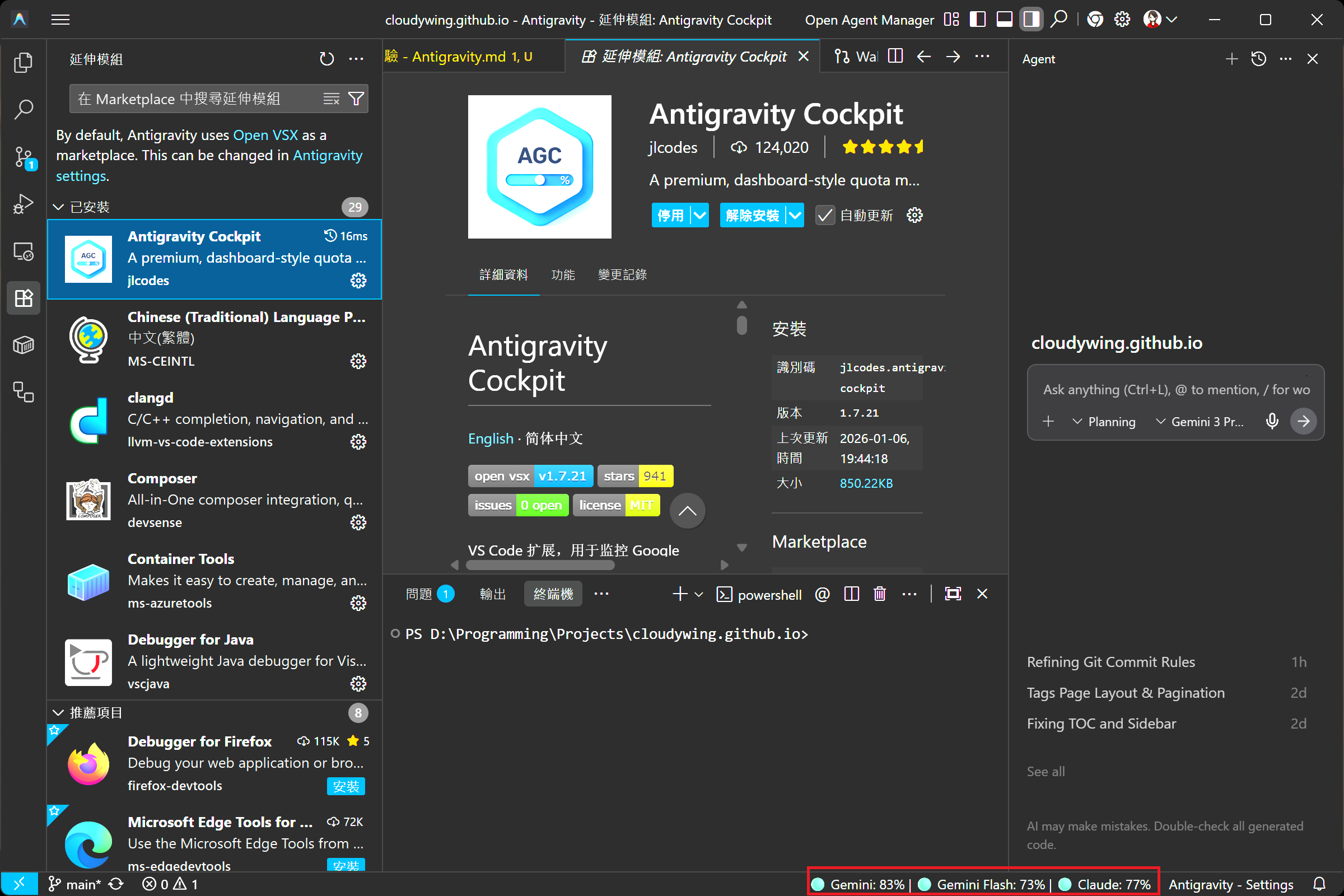
This is a must-install core extension for Antigravity. Once installed, it displays an overview of available quotas for each model in the bottom right corner.
TIP
I manually modified the Group names in the image; the default display seemed to be Group 1 and Group 3.
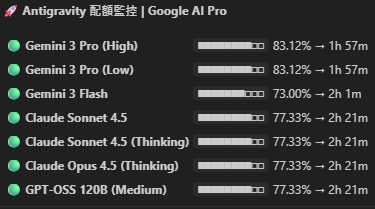
Hovering the mouse cursor over the icon displays the detailed remaining quota and reset time for each model; clicking it directly opens the full Dashboard. Additionally, when the quota drops below 30%, the system automatically triggers a low-power alert.
TIP
Antigravity's quota pool is calculated separately from the web version of Gemini (Gemini 3 / Advanced). This is different from Claude (where exhausting Claude Code quota affects the web version's Chat usage), so you don't have to worry that writing code in the IDE will consume too much and prevent you from using the web version.
WARNING
Although a single Quota Group contains multiple models (e.g., the Gemini series shares one group; Claude and GPT-OSS share another), this does not mean that the weight of quota consumption for different models within the same group is the same.
There is also an extension called Antigravity Quota that can check quotas, but the interface is relatively basic and the features are simpler.
TIP
In addition to the Cockpit extension, you can also check the remaining quota for each model directly on the Open Antigravity User Settings => Models page.
User Interface
Since Antigravity's AI interaction interface is different from standard VS Code, here is a brief explanation of the main functional areas:
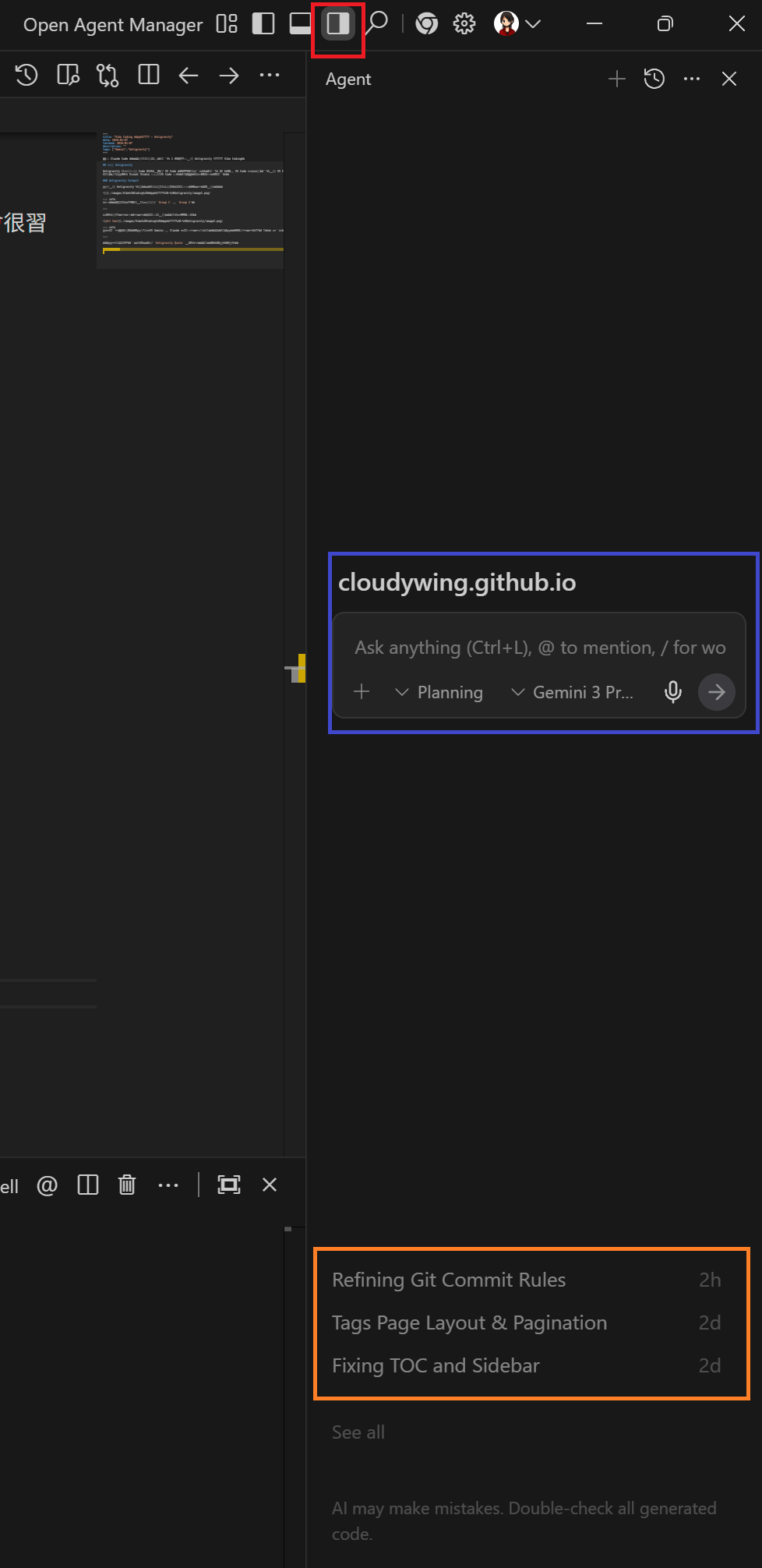
- Agent Window Toggle (Red box): If you accidentally close the AI chat window, you can click here to reopen it.
- Chat Input Box (Blue box): Enter commands here to have the AI execute operations.
- History (Orange box): After restarting Antigravity, if you want to retrieve previous conversation Context, you can recover it from here.
Permission Settings
There is a setup wizard during installation, and you can also adjust settings later via Settings => Open Antigravity User Settings. It is recommended to set different permission levels based on the nature of the project.
1. Agent Behavior and Review Policy
These settings determine the autonomy of the AI when executing actions:
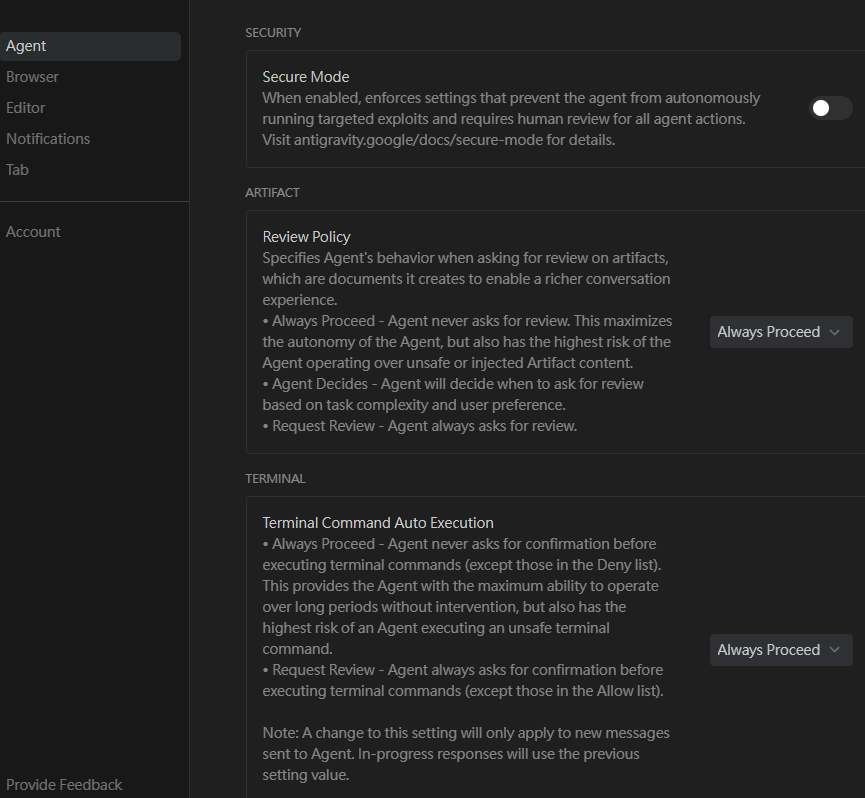
- Review Policy: When you make a request, the AI generates an execution plan.
Always Proceed: Always execute automatically without confirmation.Agent Decides: The Agent decides whether human intervention is needed.Request Review: Always requires the user to manually approve the plan.
- Terminal: Controls execution permissions for terminal commands (e.g., Commit, npm install, etc.).
Always Proceed: Execute directly.Request Review: Requires user approval.
2. Browser Tools Settings
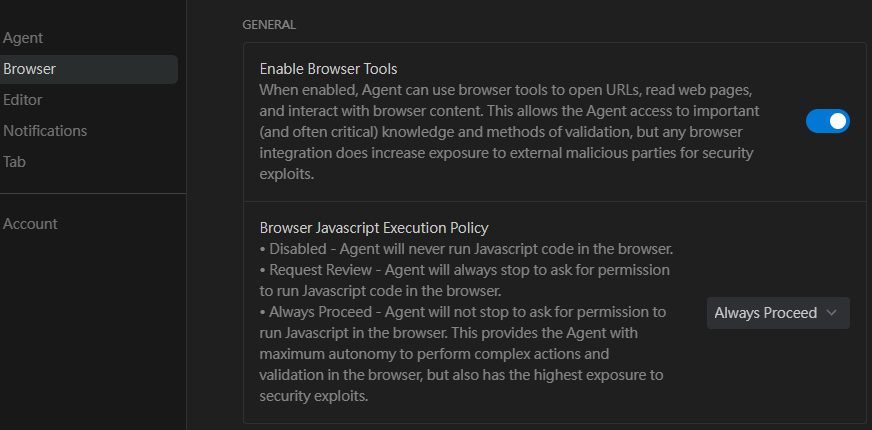
- Enable Browser Tools: Whether to allow the Agent to read external websites.
- Browser Javascript Execution Policy: Whether to allow the execution of JavaScript on web pages.
Disabled: Prohibited.Request Review: Requires approval (recommended option, especially for websites involving financial transactions or external integrations).Always Proceed: Execute automatically.
3. Conversation Mode
In addition to selecting models in the input box, you can also switch modes:
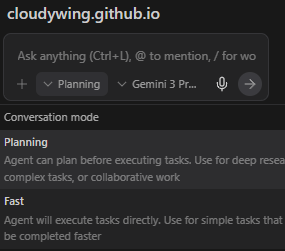
- Planning: Think first, generate a plan report, and execute only after user confirmation (more robust).
- Fast: Execute tasks directly, potentially ignoring some Review Policy settings (suitable for simple tasks; I generally do not use this).
Actual Experience
Coding Feel: Ghost Text
Before diving into specific projects, let's mention the basic coding experience of Antigravity. It has a built-in code completion feature (Ghost Text) similar to GitHub Copilot.
It predicts the operations I want to perform based on context. If I make a typo, seeing its red suggested revision allows me to discover and fix it in advance.
Visible Thinking Process
When Antigravity processes a command, the interface first displays Thinking for..., and after the thinking is complete, it changes to Thought for.... Clicking to expand this block allows you to view the Agent's complete thinking path.

When using Chinese commands, the Gemini model's thinking process usually still displays in English, while the Claude model displays in Chinese. By observing this thinking process, I can confirm whether the Agent correctly understands my intent or discover deviations in the direction of thought in real-time.
Case 1: English Listening Practice Project (SoftwareEnglishPodcast)
The first project I used for practice was a tool for generating English listening podcasts.
If I were using the web version of Gemini 3, handling this type of task would be painful:
- Unstable Output Format: Unlike Claude, which can generate files to Artifacts, it is easy to lose formatting when selecting content. Furthermore, the content it generates often includes other conversation text, requiring deletion after a full copy. If the code block in the output contains other code blocks, it causes the format to be truncated.
- Difficult Version Iteration: If multiple optimizations are needed, it is easy to lose Context, and pasting the code again every time is also troublesome.
After switching to Antigravity, it can directly operate on the file system in this project, perfectly solving the above problems. I only need to issue a command, and it reads the existing code, makes modifications, and saves the file. The entire process is much smoother.
Case 2: Technical Blog Migration (This Project)
This is my current technical blog project. Initially, I just discovered that GitHub has GitHub Pages as a static website platform, and since I had an existing technical blog project, I wanted to test it.
Of course, transferring notes from HackMD later was another story.
Automated Image Migration
Early blog images were hosted on Imgur, but later, all notes were backed up on GitHub, so I considered moving them to GitHub. Later, because Imgur started blocking uploads from Taiwan IPs, migration became necessary. This task would be overwhelming if done manually, but it was very simple with Antigravity:
"Check the Imgur image links in the Markdown files throughout the project, download the images to the
imagesfolder (using the article filename as a subdirectory), rename the images based on context, and replace the links in the articles according to the specified format."
It generated an execution plan based on the input, and after I confirmed it was fine and asked it to execute, it automatically completed the migration and link replacement for hundreds of images.
Painless Framework Transfer
At first, I had it convert to Jekyll format, but after discussing it with Gemini 3, I decided to switch to VitePress. Whether it's Jekyll or VitePress, they both require Frontmatter in the Markdown header. The most tedious part was actually data completion—I spent a day finding the original publication date and corresponding Commit records for each article from the original HackMD, manually adding the change history, and standardizing the format.
Once the data was ready, the rest of the work was simple. I had Antigravity read the organized change history and titles, and it automatically generated Frontmatter meeting the framework requirements for each article, completing the final conversion.
Batch Updating HackMD Content
Initially, I wanted to maintain both HackMD and GitHub Pages simultaneously, but due to maintenance cost considerations, I decided to maintain only GitHub Pages. However, I had already migrated the images to GitHub and manually updated the content with the new links back to HackMD.
To end the maintenance of HackMD, I used a script to call the HackMD API to update all old articles, adding a migration notice. Using Antigravity made this very simple; I didn't have to worry about how to write the script or how to call the HackMD API. I just wrote the logic and let it handle it. The subsequent process was as follows:
- Call the HackMD API to get a list of all article IDs and titles.
- Prepare a Markdown template containing "Article migrated notice...".
- Have Antigravity write a script to match the local Markdown files with the HackMD article titles (even if they are not perfectly consistent due to special characters in filenames or directory structure differences, it can intelligently distinguish them).
- Automatically call the API to replace the content of each HackMD article with the migration notice containing the new link.
Just like that, the "farewell" task for 87 articles was solved at once.
TIP
I had a local copy of all the articles, so I wasn't afraid of it failing, but normally, you still need to understand how to use the HackMD API when executing.
Browser Control Automated Testing
If your Chrome has the Antigravity Browser Control extension installed, Antigravity can directly control your browser for End-to-End testing. Of course, its testing involves reading the DOM using JavaScript, so for some style issues, such as discrepancies in different page widths, it might say it has taken a screenshot and thinks it's fine, but in reality, the problem is not solved.
The Claude model sometimes proactively uses this feature; I haven't seen the Gemini model use it proactively yet, but it can be requested with explicit commands.
When using this feature, it calls the Gemini Flash model to write automation scripts, so you will see two models consuming quota simultaneously. According to my experience, the quota consumed by Gemini Flash during this process is usually higher than that of the main model.
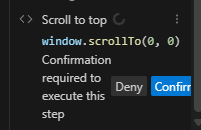
If the Policy is set to Request Review, a confirmation window will pop up before each browser operation (as shown below).
TIP
Because my site is a static site and does not involve any external integration, I set it to Always Proceed; if it involves backend data writing or financial transactions, it is still recommended to set it to Request Review.
Agent Memory Settings
In the official documentation, I discovered that you can provide background information to the Agent by creating a GEMINI.md file.
This concept is very similar to using the CLAUDE.md file in Claude Code; the Agent will be forced to refer to it when planning tasks.
TIP
Although the link is for Gemini Code Assist, it also works for Antigravity. If you want to test it, you can try writing a sentence in ~/.gemini/GEMINI.md: "Rule: Always add 'Pika Pika' at the end of your sentences when answering." Close all open windows, click on another file (if you open Antigravity, it might read the currently opened file and the file currently focused in the working directory), and input Hello in a blank context to see if Antigravity's response adds Pika Pika.
Scope and Inheritance of GEMINI.md
You can create GEMINI.md files in different locations to control different scopes:
| Scope | Location |
|---|---|
| All Projects | ~/.gemini/GEMINI.md |
| Specific Project | Working directory or any parent directory, up to the project root (identified by the .git folder) or home directory |
| Specific Component, Module, or Sub-section of a Project | Subdirectory of the working directory |
The Agent's memory system loads content files from multiple locations and follows these inheritance rules:
- More specific files take precedence: The content of
GEMINI.mdfrom a specific component or module will overwrite or supplement the content from more general content files (such as the global~/.gemini/GEMINI.md). - Load from near to far: The Agent starts from the current working directory, searching and loading all
GEMINI.mdfiles layer by layer upwards until the project root or home directory.
Practical Application: Locking Commit Conventions
My most common practice is to use it to lock Commit conventions to ensure that the Commit Message written by the Agent is what I want.
Pitfalls and Issues Encountered
Although Vibe Coding allows me to complete projects without understanding the current frontend ecosystem (Vite/Vue/Vitepress, etc.), there are still some pitfalls to be aware of:
1. Snapshot Mechanism Pitfalls
Antigravity takes snapshots of files. If you manually modify files with Git while it is working (or if its previous Commit didn't update the snapshot), it might overwrite new changes with old content, leading to chaotic Git history or file content rollback.
2. Encoding and Script Preferences
- Gemini Model: Prefers writing Python (
.py) scripts for batch file processing. - Claude Model: Prefers using PowerShell (
.ps1) scripts.
When I was adjusting project names, the PowerShell script written by Claude made an error in handling file encoding, turning all Chinese content into garbled text. Worse, it used the broken encoding when reading the file and thought "it's fine," but I could have discovered it if I had checked the Git Diff in real-time. But because I was testing, I didn't intervene too much, and the 5-hour quota for that round was burned.
Later, I discovered multiple instances of broken encoding, so when asking it to process files, I must specifically tell it to use encoding-safe methods.
3. Residual Files
Because both Gemini and Claude models use scripts when executing tasks, or output some content to txt files first, these files remain in the root directory. Therefore, it is easy to accidentally Commit them. If the project definitely won't have these types of files, it is safer to set an ignore list in .gitignore.
4. Hallucination
Even with Enable Browser Tools enabled, it sometimes gets lazy. For example, I previously asked it to help me check the source of an official article, but the URLs it gave me were wrong several times. Later, I found out that the official announcement was only sent via email to users and there was no press release. This also happens often with Gemini 3; I have often given it a URL, and it might not have crawled it at all, but instead made up content based on the URL name.
5. Limits of Style Adjustments
For those unfamiliar with frontend (like me), Vibe Coding can handle the big architecture, but when encountering subtle CSS/RWD adjustments (such as precise positioning of floating buttons), it often falls into a cycle of "fixing A breaks B." If you have enough frontend knowledge, intervening directly is usually much faster than communicating with AI.
6. Limitations of Batch Processing and Semantic Understanding
When batch processing files, sometimes Antigravity doesn't actually read those files but directly writes a script to process them. For example, I asked it to help me check for mainland Chinese terms in articles and convert them to Taiwan terms. It might just write a script to perform the conversion, for example, replacing "项目" (item/project) with "專案" (project). However, it is possible that in that context, it should be "項目". Therefore, it is strongly recommended to have it read everything first before deciding how to adjust. I didn't choose Fast mode because I might want it to generate a description for each article based on its content; Fast mode might just use the first paragraph of the article as the description, whereas Planning would ask before doing so.
7. Hidden Technical Debt
Although the code written by AI looks like it works at first glance, and even handles details better than I do, if not carefully Reviewed, it is easy to produce code with technical debt. For example: scattering the same string directly everywhere instead of extracting it into shared constants.
Such code can run for now, but maintainability is extremely poor. This also highlights that Vibe Coding does not mean you can "throw away your brain"; on the contrary, the user's technical foundation determines the lower limit of code quality. If there is a lack of corresponding knowledge to verify the AI's output, the project will quickly become a pile of unmaintainable code.
Conclusion
Compared to previous chatbot interactions, Antigravity is more like directly "directing" the AI to do things, letting the Agent help me modify files and run migrations directly.
Those "not difficult but annoying" tasks (like my image migration and framework conversion this time) can be automated using it; but if you need to significantly change program logic or perform destructive operations like Git Reset, you still need to pay attention to the modified content, and it is best to handle it yourself.
Change History
- Initial document creation.
- Added explanation of GEMINI.md scope, inheritance relationship, and testing methods.
- Added information regarding Google's adjustment of the Antigravity quota mechanism on 2026-03-12.